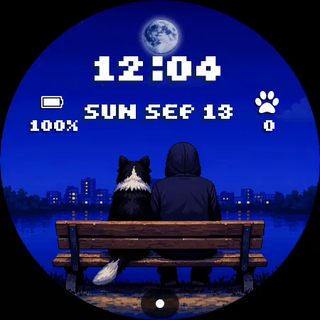
Cosy · Digital · Coming soon
Pixel Pet
A warm pixel-art dog watch face with 14 breeds and changing skies
Free Android app for finding and installing watch faces.
A little world for your wrist
A little dog who keeps you company — and the time.
Coming soon to the Pixelpond app.
Made for Wear OS
Built for Wear OS 6 or newer. Release details will be confirmed before launch.
- TimeDigital
- Pets14 breeds
- ScenesWeather
Privacy
Full privacy policy
Privacy Policy - Pixel Pet: Retro Dog Watch
Effective date: 2026-07-25
This Privacy Policy applies to 'Pixel Pet: Retro Dog Watch' (package name: 'com.pixelpond.pixelpet.retrodogwatch'), developed by Pixelpond. This watch face is a local, device-only application. It does not collect, store, transmit, or share any personal user data, health metrics, step history, device identifiers, or location information with the developer or any third parties.
The watch face reads the following information only to render itself:
- Current system time and date to display the watch clock.
- Device battery level to display the battery status indicator.
- Active step count from the system pedometer sensor to render steps.
- Heart rate reading from the device heart-rate sensor, only when a heart-rate utility preset is active. This is accessed strictly on-device.
- Local weather condition and temperature data provided by Wear OS weather services, only when a weather utility preset or weather-linked scene is configured.
- Unread notification count from the system notification state, only when an Alerts utility preset is selected, and only as a numeric value displayed on the face.
- Your custom configuration selections (such as selected breed, background scene, retro palette, and font) to customize the visual theme.
All data access is mediated dynamically by the Wear OS system. The watch face does not request app-level runtime permissions. Because it is built using the declarative Watch Face Format, it contains no executable code (android:hasCode="false"), lacks network access permissions, and cannot transmit data. It contains no advertisements, in-app purchases, analytics tools, crash reporting software, or third-party SDKs.
If you have questions, contact: support@pixelpond.au
This policy may be updated. The latest version will live at the URL provided in the Google Play listing.